How do I change my name or password?
Open Your settings from your account menu, then press Change next to your name or your password. You can't change your sign-in email yourself; get in touch with us and we'll help.
Last checked 20 November 2026
Open Your settings from your account menu and press Change next to your name or your password. Your email address is shown there too, but you can’t change it yourself.
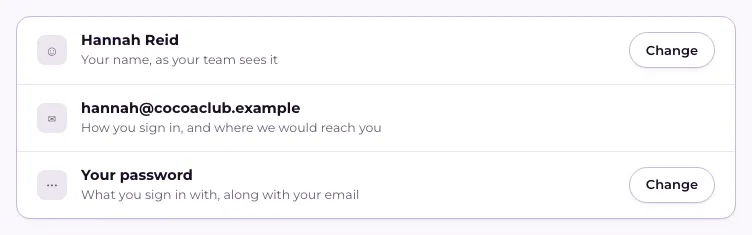
Change your name
Section titled “Change your name”- Open your account menu and press Your settings.
- Next to your name, press Change.
- Type the name you want your team to see and press Save.
Change your password
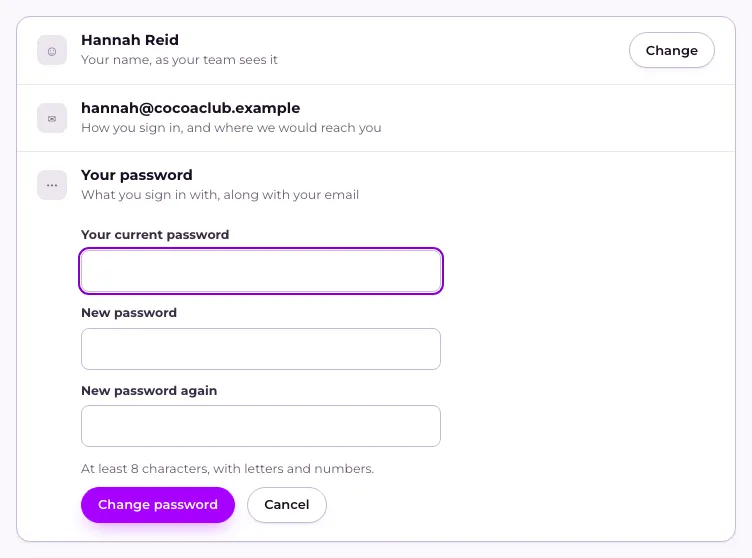
Section titled “Change your password”- On Your settings, press Change next to Your password.
- Type Your current password.
- Type your New password, then type it again under New password again. It needs at least 8 characters, with letters and numbers.
- Press Change password. Use the new one next time you sign in.
Changing your password signs you out on every other phone, tablet or computer you were signed in on; you stay signed in where you changed it. If you connected Flub to Claude, Claude asks you to connect it again.
If you’ve forgotten your current password, see I’ve forgotten my password.
Changing your email
Section titled “Changing your email”Your email is how you sign in and where we send your codes, and there’s no way to change it yourself. If you need a different address, get in touch with us and we’ll help.
Related
Section titled “Related”© Flub 2026 | What's new | useflub.com
Flub is a trading name of FLUB INDUSTRIES LTD, a company registered in England and Wales (no. 17491066). Registered office: The Workstation, 15 Paternoster Row, Sheffield, S1 2BX, United Kingdom.